Akero Release Notes (31/08/2022)
1665403005882
Akero Navigation Menu Update
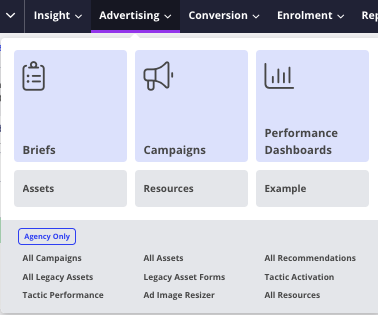
The Akero navigation menu has now been updated and restyled to support the latest Akero proposition and to make navigation around the system easier to use. Changes related to this include:
Primary features will be emphasised under each navigation item
Disabled features will appear in the navigation menu but will be locked in order to upsell and make clients aware of additional features in the system
Leads will be renamed to Enquiries (UK)/Inquiries (US) for newly created accounts. These can still be changed in the account settings if clients would like to use alternative terms.
The Leads by Source page will now be accessible via the Leads table rather than the navigation menu.
Media Plan Amend Requests - Post Approval
After a media plan has passed the 'Approved' stage, clients will now be able to request any additional changes to their plan via Akero rather than via email.
Clients will be able to do this using a 'Request Changes' button at the top of both the Media Plan and the associated Performance Dashboard.
Once a request has been submitted, an automated notification email will be sent to the planner for the campaign.
This request will be stored in the Activity Feed sidebar in the media plan where the planner can approve or reject the request.
Watermarked Imagery - Asset Reminder
When uploading creative assets in Akero, the creative team will now be able to select whether or not they have uploaded watermarked imagery within each variant via a new checkbox. Once the creative has been approved by the client, an automated email will get sent to the creative assignee reminding them to replace the watermarked imagery and the assignee will be able to re-upload the imagery in the system.
Share Assets Link
Within the Assets tab in the media plan, clients will now be able to share assets with other members of their team who do not have an Akero log in. This can be used when clients want to share/receive feedback on assets that they have drafted before submitting, or assets that the agency have produced for them. Clients will have the option of sharing the assets table and all assets within it, or only individual assets.
Asset Reminder Pop Up
After a media plan has passed the 'Approved' stage, agency users will be reminded (via a pop up modal) of any tactics that do not have assets assigned to them. Agency users can then go into each of the listed assets and either assign an asset to them, or select that assets are not needed for the tactic.
'Action Required' Delivery Stage Email
A new automated email will be sent to Planners when a programmatic or biddable tactic is due to go live within 3 days, but is still at any of the following delivery stages:
A0 - Planning Stage
A1 - Booked In
A2 - Ready for Purchase (R&F Only)
A3 - Reserved (R&F Only)
A4 - PO Raised & Booked In
B1 - Write Ad Groups
B2 - Ad Groups Written
C0 - Creative in Production
C3 - Creative Signed Off
D1 - Creative sent to Supplier
D2 - Supplier Amends
E1 - Prepare tracking sheet
E2 - Trafficking sheet complete
Minimum Tactic Budget Reminder
When creating a tactic, agency users will be reminded of the minimum recommended budget for a tactic (£2000) if the budget that has been entered is below this.
VAT Preference in Account Settings
The default VAT preference for media plans can now be set by agency users in the account settings for all clients.
Reddit Maximum Live Duration
Newly created Reddit tactics in Akero can now only have a maximum live duration of 6 months as Reddit will only store data for this period of time.
Confirmation Fields in Form Builder
Within the form builder, users can now set up confirmation inputs for form fields via a new 'Confirmation' tab in the field settings. This will allow users to add duplicate fields to their form to help ensure leads are submitting the correct information. For example, if a client wanted to ensure that a lead enters their telephone number correctly, adding a confirmation field will require the lead to input the same information twice and will prevent them from submitting if both telephone numbers do not match.
This can be set up for the following form fields:
Email
International Telephone
Telephone
International Mobile Number
Mobile Number
Postcode
Zipcode
Website URL
Short Answer
Number
Advanced Create Lead Workflow Action
Within the workflow builder, a new 'Advanced Create Lead' action has been added. This action will allow a user to create new leads based on the selected triggers/filters within the workflow and will allow them to select the sources in which the lead information should be populated from (e.g. contact properties, catch hook data). This may be particularly useful if clients want to create new leads based on data that has been sent from their CRM into Akero via web hooks.
View Latest Catch Hook Data
Within the workflow builder, users will now be able to easily access the latest catch hook data when using the catch hook triggers and actions. This information will be available via a new 'View Latest Catch Hook Data' link.
